
Tools galore
Try opening a piece of design software today without an AI feature staring right back at you. When certain (unnamed) legacy software giants insist on slapping AI anywhere they can, the constant push for speed and efficiency starts to drain the joy out of making things. Obviously they aren’t all bad - let’s be honest, none of us are going back to a world without AI background removal.
AI lets you reach conclusions faster, which is great for the bottom line. But rushing straight to the finish line often means skipping the thought processes that make the work fun and interesting, both for the designer and the viewer.
There are exceptions, of course. Tools like Figma Make are truly useful for sketching out complex ideas on the fly, letting you see if an out-there concept actually works before committing hours to it. Creative folk (myself included) love a good jumping-off point, and this is a brilliant way to get one.
Tools we've developed for research and production in Figma Make
There are loads of incredibly talented people out there making design tools just for the fun of it - whether coding from scratch or vibe-coding. So, we thought it would be fun to test out the most interesting and experimental tools we could find, no matter how weird or niche. The point wasn’t to find tools that automate menial tasks or shave off a couple of minutes, but simply to play around and see what gets us properly excited to keep creating.
If something turns out to be useful for our day-to-day work, fantastic. But that’ll a bonus, not the goal.
TOOOOOOLS - Martin
A tool to transform images and videos with effects like dithering, halftones, distortion, ASCII, CRT. I used the Positively Languages icon as an example to test out what it can do.
I think it’s a really cool tool. You know, something that might take a while to play around with in Photoshop, you can do in seconds here, just by moving a few sliders. It’s super intuitive. And if you want to make an image feel more ownable, or make a logo more expressive, say, for merch or something like that, it’s a really simple way to experiment to see what works.
Built by Daniil Sukhovskoy - View TOOOOOOLS
Typoclast - Ollie
Unlike most design tools, Typoclast operates as a destructive editor, dismantling existing elements to create something entirely new.
After having great fun playing around with it (and enjoying the sound effects), I found that despite its destructive nature, it feels entirely additive to the creative process. Where so much software rushes you straight to the finish line, the freedom to explore in ways you wouldn't normally consider introduces a refreshing step to the design workflow, prompting you to approach your work from a fresh angle and try new things.
Built by Edoardo Pensieri - View Typoclast
LiquiType - Lizzie
A simple concept, but with the potential to suck you in for hours of type tinkering. Liquitype is a type editing tool that sets each character up on it’s own grid. You can play around with things like grid size, pixel roundness and liquid radius – and the best thing is it will update the whole character set. Once you’re happy, you can even export your new typeface as an .otf to use in the real world.
I think it’s a great tool to experiment with, and with the amount of customisation it offers it could prove useful for any number of design projects where the pixel aesthetic fits. Aside from that, it’s also great fun. I could spend hours and hours creating different typefaces (googly eye typeface incoming).
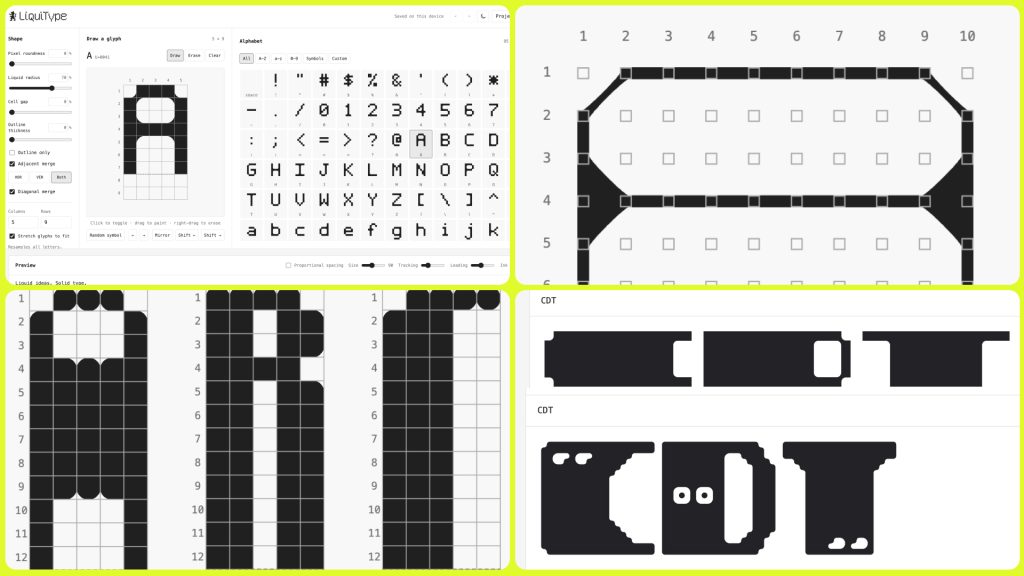
Built by Anton Burmistrov - View LiquiType
Book of Shapes - Harry
When you’re designing a pattern for a brand, it's easy to get stuck on where to start. Tools like Book of Shapes by Nikolaj Sokolowski can really help you get started in the initial phases. It’s basically an editor for vector graphics that lets you tweak different designs and download the result as an SVG. Playing around with the settings is a great way to get unstuck and open your mind to new ideas.
Built by Nikolaj Sokolowski - View Book of Shapes
Gradient Tool - Amy
I found a really cool tool for making animated gradients super fast. It runs directly in the browser so there is no install or render times.
You get an interactive 3D plane with real-time wave physics and colour shaders and you can tweak everything – sharp cuts to soft, smooth transitions. And you can easily orbit around or zoom out the camera to see more of the wave patterns across the whole canvas.
Honestly, if the camera controls were just a little more flexible it would be even better. But it’s still great. Usually you need heavy 3D software to get this kind of effect but this has an intuitive interface made for visual artists. Plus it exports cleans stills and seamless video loops up to 4k. So good.
Built by Juan Garcia - View Gradient Tool
At the end of the day, efficiency is great, but design is supposed to be fun. When every single update to our software is obsessed with getting us to a finished file faster, it’s easy to overlook that the messy, playful middle part is usually where the best ideas come from.
None of these tools are going to replace our everyday apps, and that was never the point. Sometimes the best thing you can do when you need some creative inspiration is close your usual software, mess around with a weird little web toy someone built for the fun of it, and just see what happens.